
Crypto payment cards can be used to withdraw cash from ATMs, but not every card supports this feature. Whether a withdrawal succeeds depends on the card type, the issuer's cash withdrawal permissions, ATM network compatibility, available account funds, and regional restrictions.
Certain physical cards from RedotPay, Bybit Card, and Crypto.com support ATM withdrawals. Cardholders can use compatible ATMs to obtain cash in fiat currencies dispensed by those machines. Depending on how the card is funded, the transaction amount is deducted from a prepaid balance or an eligible crypto asset account.
However, a card's ability to make Visa or Mastercard purchases does not mean it can withdraw cash from any ATM. Physical and virtual cards may have different cash withdrawal permissions, and cards issued under the same brand in different regions may be subject to different fees and limits.
1. Can You Withdraw Cash From an ATM With a Crypto Card?
An ATM withdrawal using a crypto payment card is fundamentally a cash withdrawal transaction processed through a payment card network. It is different from buying or selling Bitcoin or other digital assets at a cryptocurrency ATM.
Conventional bank ATMs do not directly access blockchain wallets or accept USDT or USDC transfers from users.
When a cardholder enters a withdrawal amount, the request travels through the relevant card network to the issuer or its authorization processing system. The system checks the card's status, withdrawal permissions, available funds, and transaction limits. If the transaction is approved, the ATM dispenses cash.
Crypto payment cards differ in how they fund these withdrawals.
Prepaid Fiat Balance Model
Users convert crypto assets into fiat currency in advance and load the funds onto their card balance. ATM withdrawals draw directly from those prepaid funds.
Some Crypto.com prepaid Visa cards follow this model. The crypto-to-fiat conversion generally takes place when the card is topped up, rather than through a new crypto sale at each withdrawal.
Conversion at the Time of Transaction
Users hold fiat currency or eligible crypto assets in a designated funding account. When a transaction occurs, the system may convert specified crypto assets according to the product's rules if the available fiat balance is insufficient.
Certain Bybit Card programs use this approach, allowing transactions to be funded with eligible assets held in the user's Funding Account.
Platform Asset Balance Model
Users hold assets eligible for card spending on a crypto payment platform. The platform provides fiat settlement funds for card transactions according to its applicable exchange rates and fee rules.
Some RedotPay card programs operate under this model.
These differences directly affect withdrawal costs.
For example, an account showing 200 USDT does not necessarily allow the cardholder to withdraw the equivalent of $200 in cash. Asset conversion, foreign exchange charges, and other fees can reduce the amount available for withdrawal below the assets' nominal value.
A platform's total asset balance should not automatically be treated as the card's available spending balance.
With Bybit Card, for instance, Spending Power depends on available fiat funds in the Funding Account, selected payment assets, and other eligible funding sources. Users can check their available amounts and asset spending priority in the card management interface.
2. ATM Withdrawals With Virtual vs. Physical Crypto Cards
Traditional ATM cash withdrawals generally require a physical payment card. The transaction is initiated through a chip, magnetic stripe, or supported contactless method, with a PIN used for authentication.
As a result, most virtual crypto payment cards designed solely for online purchases cannot be used to withdraw cash at an ATM simply by entering their card number, expiration date, and CVV.
RedotPay explicitly states that a physical card is required for ATM withdrawals. Crypto.com likewise confirms that its virtual prepaid cards do not support ATM transactions and that a physical card is necessary.
Still, advances in cardless withdrawal technology mean a physical card is not an absolute requirement for every ATM service.
Some ATMs support NFC contactless transactions, mobile wallets, or specific cardless cash withdrawal services. But an ATM with contactless capability does not necessarily accept every crypto payment card added to Apple Pay or Google Wallet.
Cash withdrawals through a mobile wallet are possible only when the ATM operator, card network, and issuer all support that transaction method.
Card Feature or Status | What It Means for ATM Withdrawals |
|---|---|
Having a virtual Visa or Mastercard number | Does not establish ATM withdrawal eligibility |
Being able to add the card to Apple Pay or Google Wallet | Does not mean ATM cash withdrawals are supported |
Having ordered and activated a physical card | Cash withdrawal permissions still need to be confirmed |
Official confirmation of ATM withdrawal support | Region, network, PIN, and limits must still be checked |
Seeing the relevant card network logo on an ATM | Does not guarantee transaction authorization for every card |
If ATM cash access is a priority, confirm that withdrawals are supported in your location before ordering a physical card. Otherwise, you could pay issuance and delivery fees only to discover that the card cannot be used to withdraw cash.
3. How to Withdraw Cash With a Crypto Card: Activation, PIN, and Steps
Checks to Complete Before Withdrawing Cash
1. Make Sure Your Physical Card Is Activated
Newly delivered physical cards generally need to be activated before use.
For example, RedotPay requires users to enter the activation code supplied with their physical card in the app. Once activated, the card can be used for supported ATM withdrawals and in-person payments.
Some card providers also let users enable or disable ATM Withdrawals independently. Both RedotPay and Bybit Card offer relevant card security settings.
If cash withdrawal permissions are disabled, an ATM transaction may be declined even when the card still works for online purchases.
2. Set Up and Verify Your Card PIN
A PIN (Personal Identification Number) is a personal code used to authenticate card transactions.
The PIN required at an ATM is not necessarily the same as the platform login password, funds password, or a 3D Secure verification code.
RedotPay allows physical cardholders to set a four- or six-digit PIN in its app. Its virtual cards do not offer the same PIN setup functionality.
Bybit Card also provides a PIN reset feature, although the exact procedure depends on the applicable card program.
Bybit's official card management guide specifically instructs users to complete a transaction at an ATM with their new PIN after resetting it. A balance inquiry is sufficient for this step. They must then complete a chip-and-PIN transaction at a merchant to finish the relevant update process.
If you forget your PIN, reset it through the issuer's official channels. Avoid repeatedly guessing different PINs at an ATM, as this may trigger a security lock.
3. Check Available Funds and Remaining Withdrawal Limits
Make sure the funds available to your card can cover both the intended cash withdrawal and any associated fees.
If the card uses assets such as USDT or USDC to fund transactions, check that the assets are held in the designated account, are selected as payment assets where required, and are not subject to frozen balances or outstanding preauthorizations.
A card balance that exactly matches the withdrawal amount does not guarantee authorization.
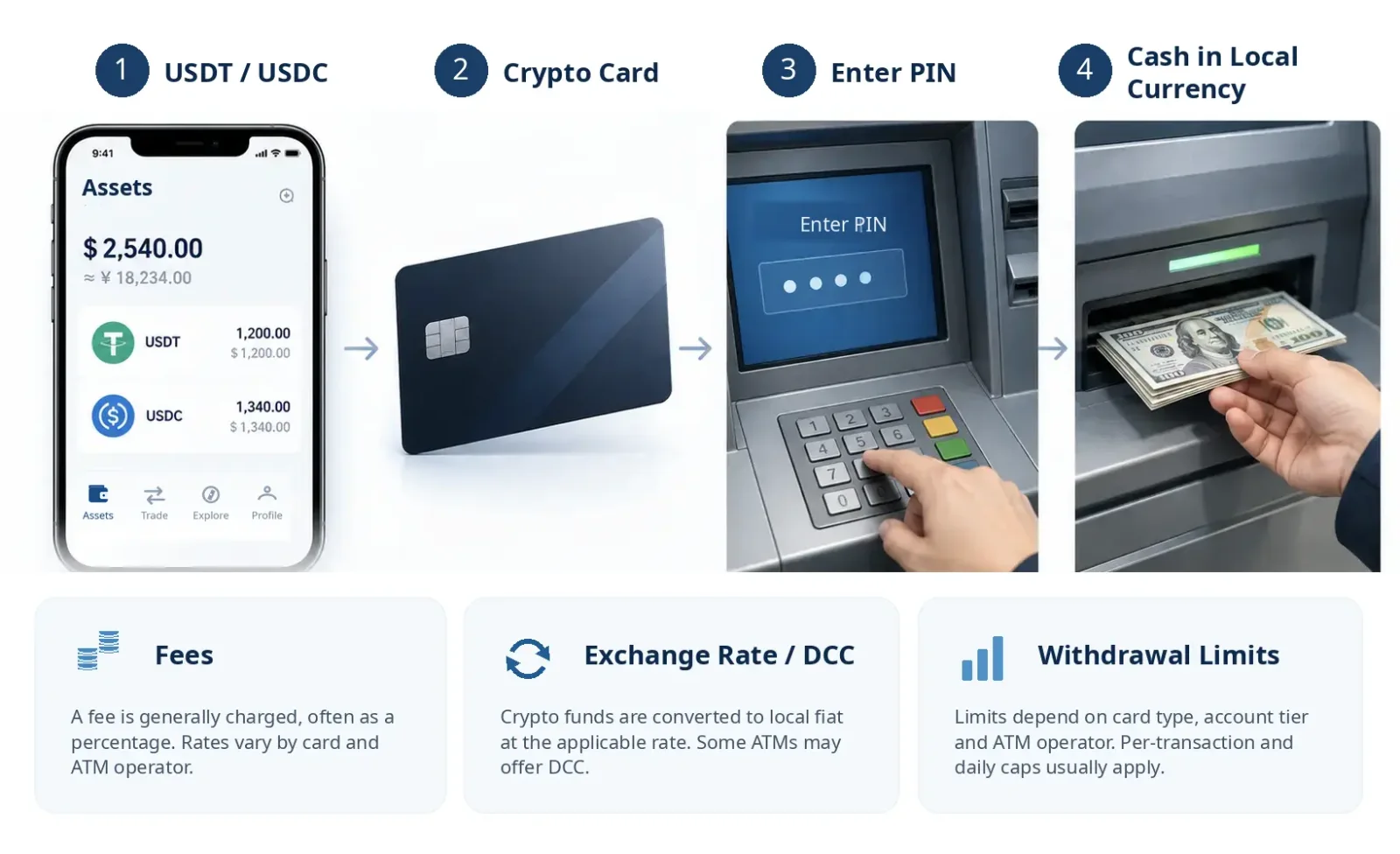
Step-by-Step ATM Withdrawal Process
Once these checks are complete, the process is similar to withdrawing cash with a conventional debit card.
Find a compatible ATM. Use an ATM recommended by your card issuer, or consult the Visa Global ATM Locator to find relevant locations. Mastercard cardholders should confirm that the machine supports the applicable Mastercard or Cirrus cash withdrawal network.
Insert or tap your card. Use the physical card's chip, or an approved contactless method if both the card and ATM support it.
Select Cash Withdrawal. Follow the ATM prompts to enter your PIN and withdrawal amount.
Select an account type if prompted. Some ATMs display Checking, Savings, or Credit. A crypto payment card may not correspond to a conventional bank account, so follow the instructions for your particular card program.
Review fees and currency conversion options. The ATM may display an operator surcharge or a dynamic currency conversion offer. Review these carefully before confirming.
Complete the transaction and check your records. Once the ATM dispenses the cash, retain the receipt and verify the actual amount charged in your card app.
If the ATM displays a fee or exchange rate that is substantially different from what you expected, you can cancel before confirming the transaction.
For withdrawals involving currency conversion, the final posted amount may also be affected by clearing timelines and exchange rate movements. The card's transaction details should be used to verify the final charge.
4. ATM Withdrawal Fees: RedotPay, Bybit Card, and Crypto.com
ATM withdrawal costs for crypto payment cards typically fall into several categories:
Fee or Cost Type | Main Source |
|---|---|
ATM withdrawal fee | Card issuer or card program |
ATM operator surcharge | ATM-owning bank or independent operator |
Foreign transaction fee | Card issuer or card program |
Crypto asset conversion fee | Asset conversion service provider |
Exchange rate spread | Difference between the executed conversion rate and a reference rate |
Not all of these costs necessarily apply to every transaction.
For example, withdrawing funds from an existing prepaid fiat balance may not incur another crypto conversion fee. Funding the withdrawal with USDT at the time of the transaction, however, may introduce additional conversion costs.
A fee-free ATM withdrawal allowance generally waives only the withdrawal fee imposed by the card issuer. It does not mean the entire transaction is free of charges.
RedotPay: Different Fees Based on Card Currency
According to RedotPay's official ATM fee schedule, published on July 27, 2026, its physical card fees are as follows:
Fee Item | Official Rule |
|---|---|
ATM withdrawal fee for HKD cards | 2% |
ATM withdrawal fee for USD cards | 2% on cumulative monthly withdrawals up to $10,000; 3% on the portion above that amount |
Transactions in the card's denominated currency | No corresponding cross-currency transaction fee |
Transactions in other currencies | 1.2% |
Applicable crypto asset conversion | 1% |
For example, withdrawing cash with a USD-denominated card in a transaction charged in dollars may involve different fees from making a withdrawal in a euro-denominated market.
If a cross-currency withdrawal also requires converting USDT into transaction funds, the ATM withdrawal fee, foreign transaction fee, and crypto conversion cost may all affect the final amount charged.
Bybit Card: Monthly Fee-Free Allowances and Excess Withdrawal Fees
According to Bybit's official fees and limits documentation, updated in September 2026, relevant card programs in Australia and the Asia-Pacific region waive Bybit's ATM withdrawal fee on the first $100 withdrawn each month. Amounts above that threshold incur a 2% fee.
Bybit provides an example of how this works.
Suppose a cardholder under an eligible program withdraws $60 earlier in the month, followed by another $110 withdrawal:
The first $60 is within the fee-free allowance.
The first $40 of the second withdrawal uses up the remaining allowance.
The remaining $70 of the second withdrawal is subject to a 2% fee.
Across both withdrawals, the total Bybit ATM withdrawal fee is $1.40.
This $1.40 excludes any additional ATM operator fees, foreign exchange costs, or crypto conversion charges.
Bybit's regional fee structures vary substantially. For example, its official schedule provides a fee-free ATM withdrawal allowance of ARS 95,000 per month for Argentine cards and BRL 550 per month for Brazilian cards. Amounts exceeding the respective thresholds are subject to a 2% fee.
An allowance offered under one regional Bybit Card program should therefore not be assumed to apply to another.
Crypto.com: Fee-Free Allowances Depend on Card Tier
Crypto.com's European prepaid Visa cards offer different monthly fee-free ATM withdrawal allowances based on card tier.
The following figures apply to users covered by its official European fee schedule, which is based on having a residential address in Europe:
Card Tier | Monthly Fee-Free ATM Withdrawal Allowance |
|---|---|
Midnight | €200 |
Ruby | €400 |
Indigo / Jade | €800 |
Icy / Rose | €800 |
Obsidian | €1,000 |
The amount withdrawn beyond the monthly fee-free allowance is subject to a 2% ATM withdrawal fee under the applicable rules.
One detail is particularly easy to overlook:
Crypto.com's European fee schedule explicitly states that ATM operator surcharges, where applicable, also count toward the ATM withdrawal limit.
This does not mean Crypto.com waives those operator charges, nor should the same method of calculating withdrawal limits be assumed for other card providers.
The foreign transaction rules effective October 1, 2026, for Crypto.com's European cards also impose different rates depending on card tier and transaction location. For example, certain tiers are subject to different conditions for non-euro transactions within the EU and UK than for non-euro transactions outside those regions.
Full details are available in the Crypto.com European Fees and Limits Schedule.
Frequent ATM users should consider fixed surcharges imposed by individual ATM operators in addition to the card fees above. If every withdrawal carries a flat charge, making many small withdrawals can significantly increase costs.
5. Cross-Border ATM Exchange Rates and DCC: Avoiding Extra Costs
When using a crypto payment card to withdraw cash abroad, an ATM may ask whether you want the transaction processed in the local currency or your card's denominated currency.
This is where Dynamic Currency Conversion (DCC) comes into play.
Suppose you have a USD-denominated crypto payment card and want to withdraw €100 in a country that uses the euro.
The ATM may offer two options:
Process the transaction in euros: The card network and relevant issuer handle currency conversion under their applicable rules.
Process the transaction in US dollars: The ATM operator converts the €100 into dollars first and submits the transaction in USD.
The second option is generally a DCC transaction.
The exchange rate offered by the ATM operator may include an additional markup. Accepting DCC also changes the conversion route and fee structure applied to the transaction.
Under Visa's official DCC guidance, merchants and ATMs offering dynamic currency conversion should display the amounts before and after conversion, the exchange rate, and any relevant fees, while allowing cardholders to accept or decline the conversion.
For most international ATM withdrawals, choosing to process the transaction in the local currency is generally a reasonable way to avoid automatically accepting the ATM's DCC quote.
However, choosing the local currency does not eliminate all foreign exchange costs. The card issuer may still charge a foreign transaction fee, and the card network applies its relevant currency conversion rules.
If the ATM provides two explicit quotes, cardholders should compare the actual costs rather than deciding solely on the basis of their card's denominated currency.
Users who regularly need substantial amounts of fiat cash should also compare the total costs of compliant bank transfers, fiat withdrawals from crypto platforms, and ATM cash withdrawals. ATMs provide relatively direct access to cash but may not be suitable for frequent or large-scale fund conversions.
6. ATM Withdrawal Limits: Per-Transaction, Daily, and Monthly Restrictions
ATM withdrawal limits are generally separate from ordinary card purchase limits.
Issuers may impose maximum withdrawal amounts per transaction, day, month, or year, as well as restrictions on the number of withdrawals permitted within particular periods.
Withdrawal Limits Across Different Products
Crypto.com European Prepaid Visa Cards
Its official fee schedule specifies:
Daily ATM withdrawal limit: €2,000;
Monthly ATM withdrawal limit: €10,000;
Annual ATM withdrawal limit: €75,000;
Withdrawal frequency: up to 3 per day, 30 per month, and 360 per year.
Bybit Card
Bybit's ATM withdrawal limits depend on the issuing region and card tier.
According to its official fee schedule, certain physical cards in the Asia-Pacific region follow these tier-based limits:
Card Tier | Daily Withdrawal Limit | Monthly Withdrawal Limit | Annual Withdrawal Limit |
|---|---|---|---|
Level 1 | Not supported | Not supported | Not supported |
Level 2 | $3,000 | $10,000 | $75,000 |
Level 3 | $3,000 | $10,000 | $100,000 |
These limits apply only to the relevant Asia-Pacific card programs. They do not represent a single global withdrawal policy for Bybit Card.
Australia, Brazil, Argentina, and other issuing regions have their own rules. Bybit's official fee documentation also explicitly lists ATM withdrawal restrictions for mainland China.
Individual ATMs May Impose Additional Limits
Even if the card itself permits relatively high withdrawal amounts, an ATM may restrict:
The maximum amount per withdrawal;
The number of banknotes it can dispense in one transaction;
Transaction amounts for international payment cards;
Supported currencies, denominations, and available cash inventory.
For example, a card may have a daily withdrawal limit of $2,000, but an individual ATM may be unable to dispense that amount in a single transaction. The cardholder may need to make multiple withdrawals.
Splitting transactions does not bypass the issuer's cumulative limits and may increase ATM charges assessed per transaction.
7. What to Do if an ATM Withdrawal Fails or Your Balance Is Incorrect
An ATM declining a crypto payment card does not necessarily mean the account has been frozen. Start by reviewing the machine's message, the card's status, and the transaction records.
Common Reasons for Failed ATM Withdrawals
ATM Message | Possible Cause | Recommended Action |
|---|---|---|
Incorrect PIN | The PIN is wrong or a recent update has not taken effect | Check the official PIN setup and reset procedures; avoid repeated attempts |
Insufficient Funds | Available funds are insufficient or do not cover the associated fees | Check the actual withdrawable balance and reduce the amount if necessary |
Transaction Not Permitted | ATM withdrawals are disabled, or the card program or region does not support them | Check the ATM Withdrawals setting in the app |
Limit Exceeded | A withdrawal amount or transaction count limit has been exceeded | Check the remaining per-transaction, daily, and monthly allowances |
Card Not Accepted | The network, card type, or machine is incompatible | Try another legitimate, compatible ATM |
Transaction Declined | Authorization, fraud prevention, or other restrictions | Contact the issuer for the specific reason for the decline |
ATM error messages are often brief. Identifying the actual cause may require reviewing the issuer's authorization records.
If ATMs operated by several different providers produce similar declines, contact the card issuer first rather than repeatedly trying different machines.
The ATM Did Not Dispense Cash, but Your Balance Decreased
In this situation, it is important to distinguish between a transaction that remains incomplete and one that has already been completed.
1. The Transaction Is Pending or Has an Authorization Hold
If the ATM dispenses no cash but the card app displays Pending or Authorization Hold, the funds may only be temporarily reserved through authorization rather than finally charged.
An Authorization Hold usually indicates that funds have been reserved following authorization. Pending is a broader processing status, and its exact meaning should be determined from the issuer's transaction records.
For example, Bybit distinguishes between Authorization and Transaction in its transaction records. The former may involve reserved funds, while the latter records actual transactions and their processing status.
At this stage, review the authorization and transaction statuses. Contact the issuer if necessary to establish whether the authorization will be reversed or the hold released.
Do not immediately repeat a large withdrawal before confirming what happened to the original transaction.
2. The Transaction Is Completed, but No Cash Was Dispensed
If your card statement shows a completed charge but the ATM dispensed no cash, you need to request a transaction investigation.
A similar problem can arise if the ATM dispenses only part of the requested amount. In that case, record exactly how much cash you actually received, not just the amount requested.
Keep the following evidence:
ATM operator name and machine identification number;
Transaction date, time, and local time zone;
Requested withdrawal amount and currency;
Amount of cash actually received;
ATM error messages or transaction receipt;
Transaction records from the card app;
Photos of the ATM or location that do not expose sensitive information such as your PIN or full card number.
Then contact the card issuer and ATM operator. Explain whether any cash was dispensed, how much you actually received, and request a review of the machine's cash-dispensing records and the transaction authorization information.
Payment card networks may provide mechanisms for resolving ATM cash withdrawal disputes. Whether a transaction can be adjusted, and when funds may be returned, depends on the cardholder agreement, applicable rules, and investigation findings.
An ATM withdrawal dispute involving a crypto payment card is not the same as an irreversible blockchain transfer. The fact that a card is funded by USDT or USDC does not, by itself, mean an erroneous cash withdrawal cannot be disputed.
What if an ATM Retains Your Card?
If an ATM retains your card, immediately freeze it through the official app or take the protective measures required by your issuer.
Contact the bank or operator responsible for the ATM to find out whether the card can be retrieved under its procedures.
If the operator cannot return the card, or there is a risk that someone else may obtain it, promptly contact the issuer to report the situation and arrange card blocking, cancellation, or replacement as appropriate.
8. Frequently Asked Questions
Can You Withdraw USDT or USDC Directly From an ATM?
Conventional bank ATMs do not process on-chain USDT or USDC directly.
If a crypto payment card supports ATM withdrawals and permits the relevant stablecoin balances to fund transactions, users can withdraw fiat cash supported by the ATM through the payment card network.
The stablecoins may be converted into fiat during the card top-up process or at the time of the transaction, depending on the product's funding mechanism.
Can You Use Apple Pay to Withdraw Cash if You Only Have a Virtual Crypto Card?
Support for Apple Pay purchases alone does not establish ATM withdrawal eligibility.
Some ATMs support contactless or cardless withdrawals, but the issuer and relevant card network must also permit that particular card to initiate cash withdrawals through the supported method.
Eligibility depends on the specific card program and ATM service.
Why Was More USDT Deducted Than Expected After a Successful ATM Withdrawal?
Possible reasons include the crypto conversion exchange rate, conversion fees, ATM withdrawal fees, foreign transaction fees, or ATM operator surcharges.
Review the actual conversion rate and individual charges in the transaction details before determining where the difference came from. Not every difference should automatically be classified as a hidden fee.
Do ATM Withdrawals Count Toward Regular Card Spending Limits?
It depends on the card program.
Some products have separate limits for ATM withdrawals and point-of-sale (POS) purchases. Others may also impose shared funding limits or overall spending restrictions.
Before withdrawing cash, check both the ATM-specific allowance and the funds available to the card.
Can a Failed ATM Withdrawal Still Incur Fees?
Not every failed transaction results in a final withdrawal fee. However, some card programs may charge for certain declined transactions, inquiries, or other services.
If your balance decreases, first determine whether the amount represents a temporary authorization hold or an actual fee. Then review the issuer's fee rules and transaction records to determine the appropriate next step.
Sources
RedotPay — Can I Withdraw Cash from an ATM, and Are There Any Fees?
RedotPay — How Do I Manage My RedotPay Card Security Settings?
Bybit — How to Consult Your Bybit Card Details and Spending Information
Crypto.com — How Do I Top Up My Prepaid Visa Card (EU & UK)?
Information verified: October 27, 2026