
When shopping online, paying for subscriptions, or adding a crypto payment card as a payment method, you may encounter errors such as "Billing Address Mismatch," "Address Verification Failed," or "ZIP Code Does Not Match." A merchant may decline the transaction even if your card has sufficient funds, the CVV is correct, and you have successfully completed 3D Secure (3DS) authentication.
Billing address information is usually a sensible starting point for troubleshooting these errors. However, not every such message means the issuer returned an AVS address mismatch. Problems with the merchant's address form, payment gateway compatibility, or risk rules can produce similar errors.
How to Troubleshoot a Billing Address Mismatch
Step 1: Determine Whether the Error Is Related to the Billing Address
Start by saving the complete error message shown on the checkout page. Record the transaction time, amount, and merchant name. If the message mentions Billing Address, AVS, ZIP Code, or Postal Code, check the address details first. If it says Insufficient Funds, Authentication Failed, or Do Not Honor, you should also investigate the available balance, authentication process, and issuer authorization decision. Not every declined payment is an AVS problem.
A generic "Payment Declined" or "Payment Failed" message does not identify the stage at which the transaction failed. In particular, the text displayed by a merchant should not automatically be treated as the issuer's reason for declining the transaction. Some messages originate from the checkout form, others are translated or categorized by the payment gateway, and some reflect the merchant's own risk decision. A transaction can still be rejected during authorization or merchant risk screening after 3DS authentication succeeds. Keeping the original error message and transaction details is more useful than repeatedly changing the address based on guesswork.
Step 2: Check the Billing Address Actually Registered for the Card
Open the crypto card's management page rather than relying solely on the personal information in your exchange account. Verify the street address, building number, city, state or province, postal code, and country. If the platform provides multiple cards, make sure you are checking the billing details for the specific card used in the transaction.
If the page does not display a Billing Address, consult the cardholder agreement or contact the card provider. With products jointly operated by a platform, an issuing institution, and a payment processor, the personal information visible to users may not correspond to the records associated with the cardholder account. If customer support can access only the platform profile, ask explicitly: "Is this the address record used for verification when I make online card payments?" Do not assume that the residential address submitted for KYC or the delivery address for a physical card is necessarily the billing address held in the issuing system.
Step 3: Review the Merchant's Checkout Form and Saved Payment Details
Compare the checkout form's country, postal code, street address, building number, and apartment or unit number against the information actually registered for the card. Pay particular attention to whether "Billing Address Same as Shipping Address" is selected, which could cause the shipping address to be submitted as the billing address.
Subscription services and online retailers may retain payment information for long periods. Even after you update the address in your card app, the merchant's saved Billing Details may still contain the previous address. It is particularly important to distinguish between the address in your account profile and the billing details attached to a saved payment card. Updating the former does not necessarily update the latter. If needed, update the payment method saved with the merchant and check that the old postal code is not automatically inserted when you try again. Do not alter legitimate address information merely to make a verification attempt pass.
Step 4: Check Address Update Status and Format Compatibility
If the address registered for the card is incorrect, change it through the provider's official channel, confirm that the update has been saved, and retry according to the provider's guidance. Some systems require time to synchronize records. An updated address in the app does not necessarily mean every related processing system is already using the new information.
If a merchant accepts only a five-digit US ZIP Code but your actual address uses a different postal code format, the problem may occur at the form-validation stage before any AVS check takes place. Similarly, if a checkout system rejects non-Latin characters, first confirm the English transliteration format accepted by your card provider, then check whether the merchant permits that format. Ask the merchant whether it supports addresses from the relevant country and cards issued in your region. Do not enter a random US ZIP Code or invent an address.
Step 5: Confirm the Verification Outcome With the Merchant or Card Provider
If the address information is correct but the payment still fails, ask the merchant's payment support team: "Did the payment processor return an AVS address mismatch or an unable-to-verify result? Was the transaction ever authorized by the card issuer?" These questions can help distinguish incorrect information, an unavailable verification service, and a merchant-initiated rejection.
When contacting your card provider, supply the merchant name, transaction amount, currency, time, last four digits of the card, and error message. Ask whether an authorization request was received and, if it was declined, why. Include the time zone to make it easier for both parties to locate the transaction. An order number or merchant-provided payment failure reference can also help. If the issuer never received an authorization request, the investigation may need to focus on the merchant or payment service provider. If the issuer explicitly declined authorization, follow the actual decline code. If the issuer confirms successful authorization but no order was completed, return to the merchant to check subsequent risk screening, order cancellation, or payment processing. An approved authorization should not be mistaken for a completed merchant transaction.
Never share your full card number, CVV, account password, or one-time verification code with customer support. Repeatedly trying different addresses can also create additional temporary authorization records or trigger limits on payment attempts.
What Is AVS, and How Does It Verify a Billing Address?
The Address Verification Service (AVS) is a risk check used in card-not-present transactions, including online purchases, telephone orders, and certain account verification processes. The merchant submits the billing address entered by the cardholder through a payment service provider or acquirer. The issuer or its processing system compares that information with the address on file and returns a verification result to the merchant.
AVS generally focuses on the street address and postal code rather than comparing every component of a full address, such as the country, city, state, floor, or apartment number, character by character. A merchant may collect all these fields and validate them using its own address-checking tools, but that does not mean every field is evaluated under the same AVS matching rules. For US addresses, the street number and ZIP Code are often particularly important. Postal code structures and street-matching rules may differ in markets such as the United Kingdom. Address normalization also varies across card networks, issuing regions, and processing systems. Two addresses that look identical to a person will not necessarily produce a particular AVS result.
Visa's Payment Account Validation documentation explains that AVS can be used alongside transaction authorization and in certain account verification workflows. In practice, the merchant sends the relevant information to its payment service provider or acquirer, the issuer or its processor performs the check, and the result travels back through the payment processing chain. Consumers generally do not see a separate AVS screen. Merchants use the returned result, together with other risk signals, to decide whether to proceed with a transaction. AVS is a risk signal, not an independent verification of the payer's identity or the legality of the transaction.
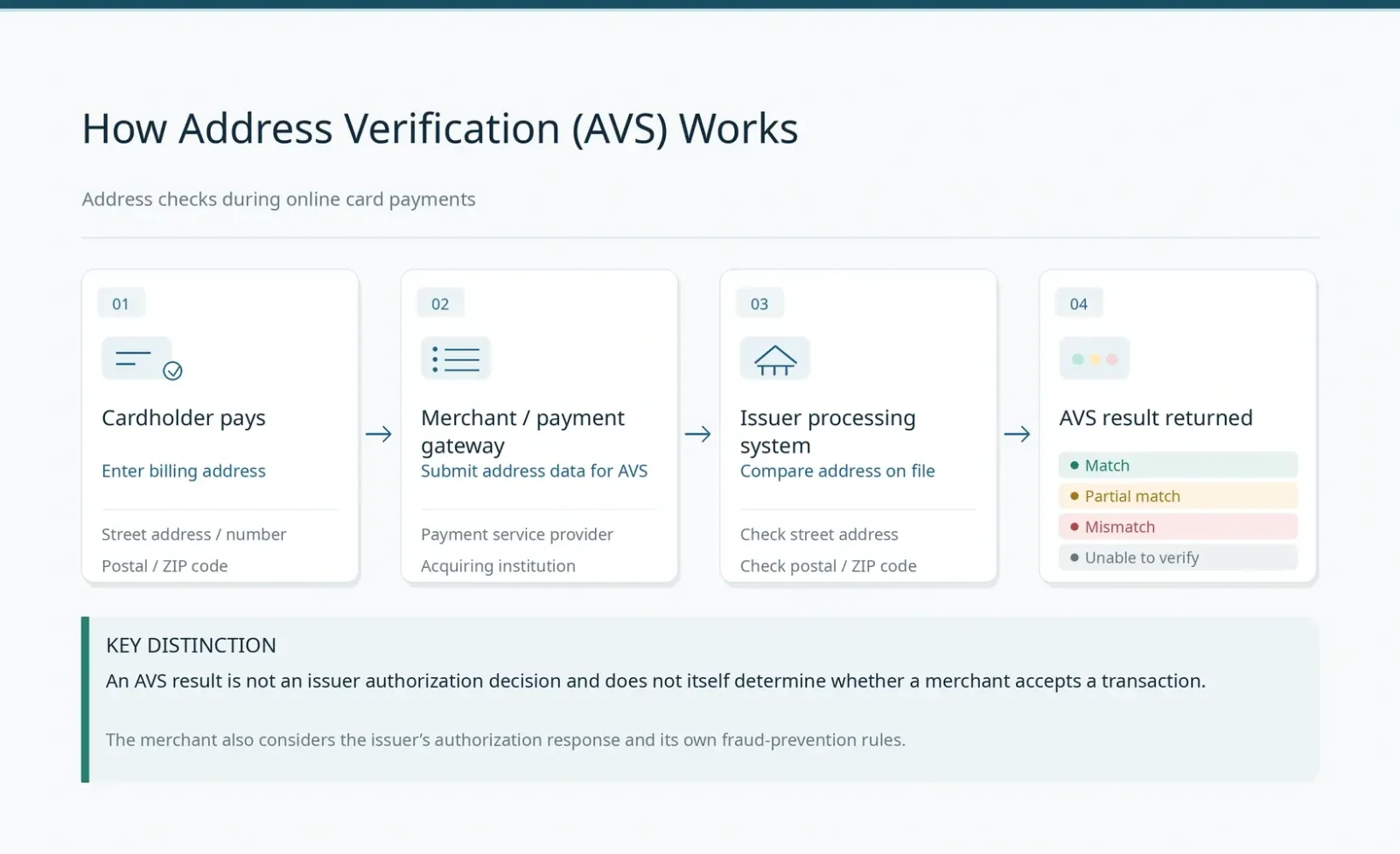
Common response codes listed in Visa's developer documentation include:
Y: Full match. The street address and postal code satisfy the applicable matching rules.
A: Partial match. The street address matches, but the postal code does not.
Z: Partial match. The postal code matches, but the street address does not.
N: No match. The relevant address information does not match.
U: Unable to verify. The system could not complete the address check.
R: An indeterminate result or a retry is required, potentially because the verification service is temporarily unavailable.
These are examples of codes used in particular interfaces and processing environments. A payment gateway may instead present results as pass, fail, unavailable, or unchecked. Code definitions and mappings are not completely uniform across card networks and processors, so merchants should follow the documentation for their actual payment processor. Ordinary cardholders generally cannot see the original AVS response code. Even when support staff can explain why a payment failed, they may have access only to the gateway's categorized response. It is therefore more useful to confirm the type of result and the stage of processing than to insist on obtaining a particular letter code.
Crucially, an address match, an address mismatch, an inability to verify, and an approved transaction are different types of outcomes. An AVS response of Y does not guarantee that the issuer will approve the payment. Responses of A, Z, or U do not mean the transaction must fail. N indicates that the address check returned a mismatch, whereas U means the system could not obtain a valid verification result. Those conditions are not interchangeable. The uncertainty represented by R is also different from a confirmed address error. A merchant may accept a partial match or reject a transaction that the issuer has already authorized based on its own risk rules. A consumer-facing "payment failed" message does not necessarily mean the issuer declined the authorization.
Billing Address vs. KYC Residential Address vs. Shipping Address
The Billing Address is the address recorded by the card service and may be used for payment verification and cardholder account management. The Residential Address is generally used for identity verification, residency eligibility, and compliance reviews. The Shipping Address is used to deliver goods or physical cards. The Registered Address is an account field maintained by the platform, with its precise meaning determined by the provider.
For traditional bank cards, the billing address is often linked to the contact address associated with a bank account. Crypto payment cards may operate differently: the platform may manage user accounts and KYC while a separate licensed institution issues the cards. These records are not always synchronized. The residential address submitted during KYC is not necessarily the Billing Address used by the card processing system. A platform may rely on residential information for eligibility and compliance checks while the issuing system maintains a separate billing address record. Even if both initially contain the same address, changing one does not guarantee that the other has been updated.
For example, a cardholder registered in the United Kingdom may order goods for delivery to Germany. The Shipping Address can be the German delivery address, while the Billing Address should still be the actual address recorded for that card by its issuer. The two do not need to match unless the merchant imposes a separate transaction requirement.
Address management permissions also vary between card programs. Some allow the billing address to be changed independently within the card management page, while others require it to remain consistent with verified residential information. After moving, cardholders should follow their provider's update requirements rather than simply entering a new, unregistered address at checkout.
Common Reasons AVS Verification Fails
1. The Merchant Has an Outdated Billing Address
A subscription service may continue using Billing Details saved when the card was first added, even though the address in the card management app has since changed. Check both sets of records separately. Updating a shipping address or account profile does not necessarily update a saved payment method. This problem is especially common after a move, card reissuance, or a long period without reviewing payment information. The customer believes the new address is being used, but the merchant is still submitting the old postal code.
2. Incorrect Postal Code or Incompatible Checkout Form
US websites commonly use a ZIP Code field, but international cards may have postal codes with different lengths or formats. A checkout form that rejects a valid postal code may have a front-end validation problem. That alone does not prove AVS returned a mismatch. Some countries and regions do not have a generally applicable postal code system. In such cases, confirm the appropriate procedure with the merchant and card issuer.
3. Differences in Street, Building Number, or Unit Information
"125 West Main Street, Apartment 8" and "125 W Main St, Apt 8" may describe the same location. Some systems recognize abbreviations, while others have more limited address-parsing capabilities. Prioritize the street number, postal code, and address format held by the issuer. Differences in punctuation or abbreviations do not necessarily cause verification to fail. Nor should you rearrange apartment, unit, or building details solely according to your usual writing habits. Any formatting adjustments should follow the card provider's accepted records and the merchant's field requirements.
4. Inconsistent Transliteration of Non-Latin Addresses
Addresses written in Chinese, Arabic, or other scripts may need to be transliterated into English or Latin characters according to the card provider's rules. RedotPay's virtual card application instructions require billing addresses to be entered in English and the city, state or province, and postal code to correspond to the selected country. Transliteration must not change the actual location.
5. AVS Cannot Return a Valid Result
AVS coverage may be limited for certain issuing regions, card brands, or processing routes. A merchant may receive a result such as U or Unavailable. This indicates that the verification could not be completed, which is different from a confirmed address mismatch. Repeatedly rewriting an address cannot make a system that does not support the relevant verification suddenly return a valid result. If a merchant rejects both "unable to check" and "check failed" outcomes, the customer-facing errors may look almost identical. Only the actual result from the payment processor can distinguish them.
6. The Merchant Applies Stricter Risk Rules to AVS Results
Adyen's technical documentation explains that merchants can configure risk checks using AVS results. A gateway may support international cards, but the merchant may choose not to accept unverifiable or partially matching addresses. PayPal's merchant-facing technical guidance likewise emphasizes evaluating different AVS response statuses rather than treating every result as a simple pass or fail. For cardholders, sharing the same card network brand does not guarantee that cards issued in different regions will receive identical treatment at a merchant. In this situation, ask whether the merchant supports the card's issuing region and what alternative payment methods it accepts. Do not invent a US billing address or falsify the account's country.
How to Manage Billing Addresses for RedotPay and Bybit Card
RedotPay Card
According to the RedotPay Help Center, users can open the app and navigate to Card → Settings → Change Billing Address, enter a new address, and save it. RedotPay's card application instructions also require the address to be entered in English, with the relevant fields consistent with the selected country. After making a change, users should verify the information displayed on the page, particularly the postal code, street address, and building number, rather than assuming that submitting the change means the details are correct.
If a merchant website reports an address verification error, start with the information recorded in RedotPay's card management section. Updating the address does not remove other merchant restrictions related to card type, issuing region, or risk classification.
Bybit Card
Bybit's card management guide describes a Billing Address update function. Users can open the My Bybit Card page, find Billing Address under Settings, select Reset as instructed, and complete the required security verification.
Bybit's card application guidance also notes that, for certain card programs, billing addresses and mobile phone numbers are managed separately from ordinary platform account information. Consequently, a change to KYC details in the exchange account does not mean the Bybit Card billing address has been synchronized. The exact steps and requirements depend on the regional card program. When troubleshooting, also distinguish the Bybit Card itself from other bank cards linked to a user's Bybit exchange account. Billing addresses for those other cards are maintained by their respective issuers and cannot be found in Bybit Card settings.
Other Crypto Payment Cards
Look for billing information and issuer details under sections such as Card Details, Profile, Billing Address, or Cardholder Agreement. If the app does not display the address or an option to change it, contact official support to confirm whether the card supports AVS, which address record is used, and how that record can be updated. Do not substitute information from your platform account, another bank card, or an on-chain wallet.
Why Can a Payment Still Fail When the Billing Address Is Correct?
AVS checks whether the billing address satisfies the applicable matching rules. CVV/CVC checks the card security code. 3D Secure (3DS) authenticates the person making the payment as the cardholder through methods such as frictionless authentication, verification codes, or confirmation in the issuer's app. These checks are distinct, although they may all be used during the same transaction.
Successful 3DS authentication does not establish an AVS match. Likewise, an AVS match does not replace CVV verification, issuer authorization, or merchant risk screening. When a merchant conducts additional risk reviews after authorization, the order may still be canceled or rejected even after the issuer approves the transaction.
Other potential causes of authorization failure include disabled online transactions, insufficient available funds, exceeded per-transaction or daily limits, and restricted merchant categories. Some merchants do not accept particular prepaid cards, virtual cards, or cards issued in certain regions, even if those cards carry a Visa or Mastercard logo.
Having enough USDT or USDC in a crypto card account only indicates that assets potentially available for spending may be present. It does not establish that the card meets the requirements for available balance, currency conversion, authorization, and address verification. Completing KYC or successfully using the card with another merchant or through Apple Pay also does not guarantee acceptance by the current merchant. To identify the problem, determine where the payment failed: rejection by the checkout form before submission, interruption during authentication, an issuer authorization decline, and merchant cancellation of an order involve different parties. Changing the billing address cannot resolve all of these situations.
When a payment is declined with a generic message, use the merchant's gateway results and the issuer's authorization records to identify the actual cause rather than attributing every failure to the billing address.
Frequently Asked Questions
What if My Crypto Card Does Not Display a Billing Address?
Check the card management page, cardholder agreement, and official help center. If you still cannot find it, ask the card provider which address is registered, whether AVS is supported, and whether the address can be updated. An address not being displayed does not mean address verification is unnecessary.
Does the Billing Address Have to Match the Shipping Address?
No. The billing address is associated with cardholder records and payment verification, while the shipping address is used for delivery. Select the merchant's "Same as Shipping Address" option only when the two addresses genuinely match. The merchant may also have separate restrictions on shipping destinations.
How Should I Fill In a ZIP Code if My Country Has No Postal Codes?
Use the genuine address format accepted by your card provider. If a merchant insists on a US ZIP Code format that does not apply to your address, ask whether it supports cards and billing addresses from your country. Do not enter a random five-digit number.
Can Crypto Cards Issued Outside the United States Use AVS?
Yes, but not all of them support it. Availability depends on the card network, issuer, issuing region, and processor. A card being issued outside the United States does not, by itself, mean AVS verification will fail.
Does a Zero-Amount Transaction or Small Preauthorization After a Failed Payment Mean AVS Passed?
No. Zero-amount account verification, small preauthorizations, AVS, and security code checks are separate processes. Even if the merchant ultimately rejects the card setup, a pending authorization may temporarily remain on the account. A temporary hold on the available balance does not mean the merchant has collected payment, nor does it establish that the address matched. Check whether the record is a pending authorization or a completed charge, and confirm its release status according to the merchant's and issuer's instructions. If you see an unexpected completed charge or multiple unexplained holds, contact the issuer to investigate rather than repeatedly attempting the payment.
Sources
Visa — Payment Account Validation: Address Verification Service
RedotPay — How Do I Change My RedotPay Card's Billing Address?
Sources verified on October 28, 2026.