
After transferring USDT or USDC from a crypto wallet to a crypto card platform, users sometimes encounter a frustrating situation: the blockchain explorer shows a successful transaction, the recipient address and transfer amount appear correct, yet the card's available balance remains unchanged.
If the deposit was intended to cover an upcoming subscription payment or an online purchase, the delay can directly affect the transaction.
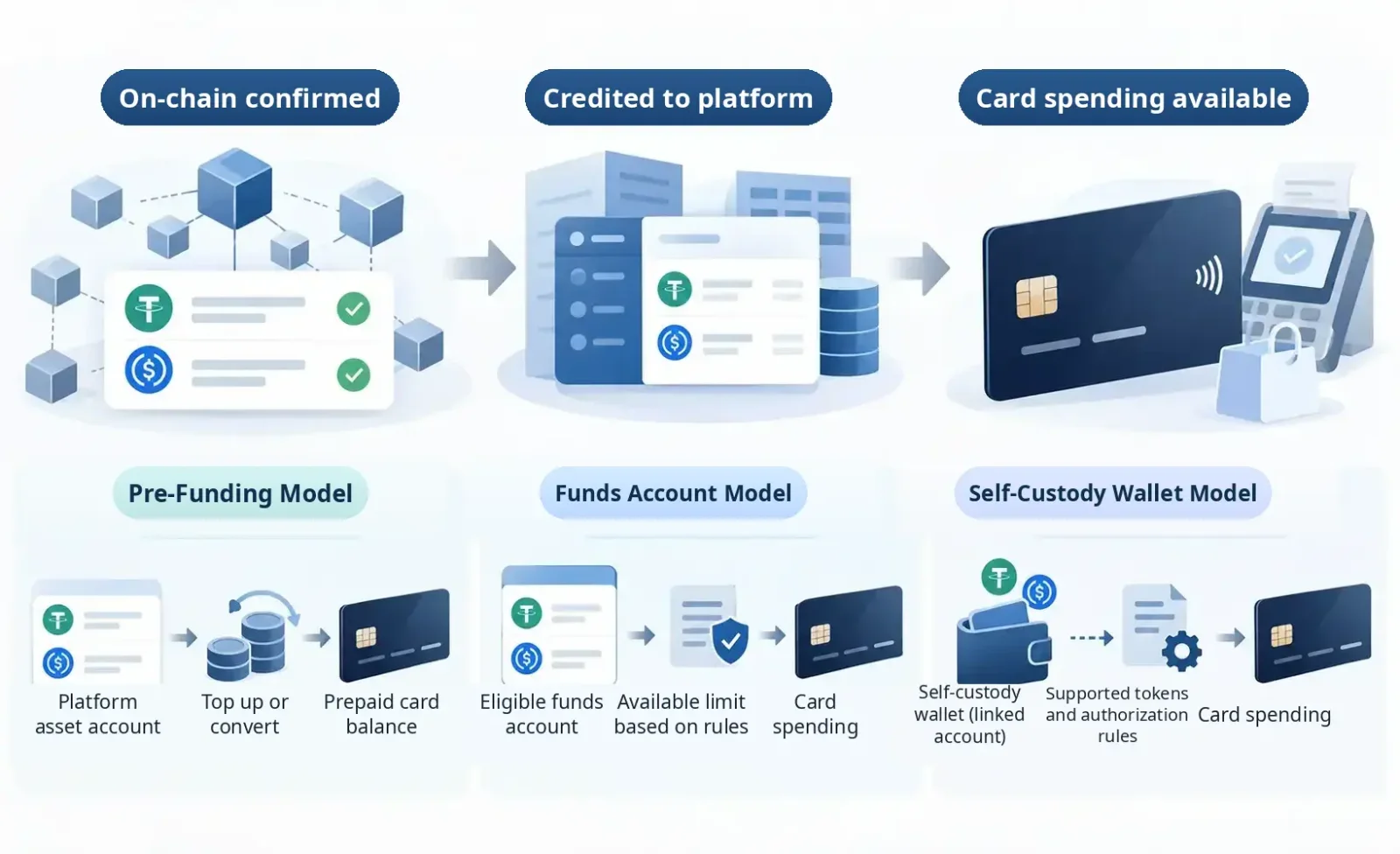
The first step is to distinguish three separate outcomes: a successful blockchain transaction, a deposit credited to the platform account, and funds becoming available for card spending.
A blockchain explorer showing Transaction Success means the transaction was successfully executed on the relevant network. For smart contract interactions, however, successful execution does not necessarily mean the intended USDT or USDC was transferred. Users must also check Token Transfers or the network's corresponding asset transfer records. Authorization actions such as Approve should not be confused with token transfers.
Even when the tokens have reached the intended address, that alone does not establish that the card platform has credited the deposit internally, much less that the assets qualify for card spending.
Crypto cards also use different funding structures. Some maintain a separate prepaid balance. Others calculate spending power directly from eligible assets in a platform funding account. Still others rely on self-custodial wallets and smart contract permissions to support payments.
Troubleshooting therefore begins by identifying where the funds have stopped moving: the on-chain transfer, the platform's deposit-crediting process, an internal account transfer, or the conversion and authorization process used to fund card payments.
Why Doesn't On-Chain Confirmation Mean a Deposit Has Been Credited?
A crypto card deposit made through a blockchain generally involves three parties or systems: the sender, the blockchain network, and the receiving platform.
After a user initiates a transfer from a wallet or exchange, the sending service creates and broadcasts the transaction. The blockchain network then validates it and includes it in a block or confirms it through the applicable consensus mechanism.
Even after the intended asset transfer has succeeded on-chain, the receiving platform must complete its own processing. This includes detecting the transaction, matching the deposit address to a user account, verifying that the asset and network are supported, and updating its internal ledger according to its deposit rules.
On custodial platforms, the asset balance displayed in the app usually comes from the platform's internal account records. A successful transaction on a blockchain explorer does not mean those records have already been updated.
For example, Bybit's on-chain deposit FAQ specifies that confirmation requirements vary by asset and blockchain. Funds can be credited only after the required number of confirmations has been reached.
Crypto.com's guidance on missing crypto deposits likewise distinguishes an initial blockchain confirmation from the platform's completion of deposit processing.
A transaction may therefore have blockchain confirmations without yet meeting the receiving platform's requirements for crediting the deposit.
Deposit Troubleshooting: What to Check Based on the Current Status
Current status | What to check first | Next action |
|---|---|---|
Sender shows Completed, but no TXID is available | Whether the withdrawal was actually broadcast to the blockchain or processed as an internal transfer | Check the withdrawal order; contact the sending platform if necessary |
On-chain transaction succeeded, but no deposit appears on the platform | Token Transfers, network, token contract, address, and minimum deposit amount | Rule out unsupported or mismatched details, then submit the TXID to the receiving platform |
Platform deposit status shows Pending | Required blockchain confirmations, outstanding information requests, and security review status | Wait for confirmation or complete verification as instructed by the platform |
Platform deposit status shows Completed, but the card's available balance has not increased | Account holding the funds, available balance, card top-up requirements, and spending authorization | Complete any required internal steps or contact card support |
Assets were sent through an unsupported network or as an unsupported token | Actual receiving network, token contract, and control of the destination address | Do not send additional funds; check official asset recovery procedures |
There is no fixed time interval between these stages that applies to every product.
If the platform's deposit record already shows Completed, repeatedly checking the block height is unlikely to help. Instead, determine which account received the funds and how the card accesses them.
If the platform has no corresponding deposit record, start with the blockchain transaction and verify the asset, network, recipient address, and deposit requirements.
Step 1: Check the Transaction Hash, Not Just the Sender's "Completed" Status
When funds fail to arrive, the most useful primary reference is usually the transaction hash, also known as the Transaction Hash or TXID.
A sending platform showing "Withdrawal Completed" only indicates that its withdrawal process has reached the relevant status. It does not establish that the receiving platform has credited the funds.
For transfers that actually occurred on-chain, use the blockchain explorer for the network involved:
Ethereum: Etherscan
TRON: TRONSCAN
BNB Smart Chain: BscScan
Solana: Solana Explorer
Use an explorer for the network on which the transaction was sent, rather than choosing an explorer merely because it supports the same cryptocurrency.
Verify the transaction status, sender address, recipient address, asset type, actual amount transferred, and confirmation status.
For ERC-20 and similar token transactions, also inspect the Token Transfers records and the token contract address.
For example, an Approve operation can be successfully recorded on-chain while merely granting a smart contract permission to use tokens. It does not itself constitute an asset transfer.
If the transaction involves a cross-chain bridge, swap contract, or another complex process, verify that the final assets actually reached the receiving address on the intended destination network.
What If the Transaction Was Never Broadcast On-Chain?
If the sender still shows Processing, Under Review, or a similar status and cannot provide a valid on-chain transaction hash, the funds may not yet have been sent to the blockchain.
Contact the sending platform first.
When withdrawing from a centralized exchange, internal security reviews, withdrawal processing, and blockchain confirmations are separate stages. They should not be treated as interchangeable.
There is another possibility: users on the same platform may transfer funds through an Internal Transfer. Such transfers move balances within the platform's ledger and may never be broadcast to a blockchain.
Bybit's deposit and withdrawal status guide notes that internal transfers may have no TXID because the funds were not transferred on-chain.
In these cases, investigate using the platform's order reference and account records rather than searching for a blockchain hash that does not exist.
Step 2: Make Sure the Sending Network Matches a Network Supported by the Receiving Platform
USDT and USDC circulate on multiple blockchain networks.
USDT, for example, can be transferred over Ethereum, TRON, and other networks. USDC also exists in issued or circulating forms across different blockchains.
But having the same token name does not mean assets on different networks can be sent interchangeably to the same deposit address.
If a platform provides a USDT-TRC20 deposit address, the user should transfer funds according to the platform's specified requirements for the TRON network.
If the sender selects an unsupported network, the blockchain transaction may succeed while the receiving platform remains unable to detect or credit the deposit automatically.
RedotPay's official deposit instructions explicitly require the sending asset and network to match those specified by the receiving platform. Unsupported assets or networks may prevent automatic crediting.
Some networks or deposit services also require an additional identifier, such as a Memo, Tag, or Comment. If the receiving platform explicitly requires one, verify that it was entered correctly. Even with the right destination address, a missing or incorrect identifier can prevent a deposit from being matched automatically to a user account. This applies only to deposit methods that require such identifiers; it does not mean ordinary USDT or USDC transfers on networks such as Ethereum and TRON generally require a Memo or Tag.
Wallet address format alone is not enough to identify the network.
EVM-compatible networks such as Ethereum, Base, Arbitrum, and BNB Smart Chain may use identically formatted 0x addresses, but they remain separate networks. An identical address string does not automatically move assets between blockchains.
Even when the receiving address looks exactly the same, users must verify that the platform accepts the specific token on the network being used.
A Correct Token Name Isn't Enough: Verify the Contract Address
On some blockchain networks, third parties can issue tokens with the same names or symbols as major stablecoins.
Seeing "USDT" or "USDC" in a blockchain explorer does not necessarily mean the asset is supported by the receiving platform.
On EVM networks in particular, check the actual token contract address against the asset information published by the issuer and receiving platform.
If a platform supports only a particular officially issued version, deposits involving other wrapped versions, bridged representations, or counterfeit tokens may not be credited correctly.
If the asset or network does not match the platform's requirements, do not test the situation by sending additional funds to the same address. First establish the actual token contract, network, and recipient address, then check official channels for any available recovery process.
Step 3: Check Whether the Deposit Is Below the Minimum Required Amount
Even when the network and recipient address are correct, the deposit amount can determine whether funds are credited automatically.
Some crypto card platforms set minimum deposit amounts for specific assets and blockchains. Transfers below the Minimum Deposit threshold may not be credited automatically.
In its explanation of missing deposits, published on July 28, 2026, RedotPay uses USDT-TRC20 as an example and specifies a minimum deposit of 1 USDT for that asset on the corresponding network.
This is a product-, asset-, and network-specific requirement under the applicable policy, not a universal minimum for USDT or USDC deposits. The official rules in effect when the deposit is made should take precedence.
Bybit's on-chain deposit rules also state that deposits below the required minimum may not be credited or refunded.
Besides the amount entered by the sender, verify how many tokens the destination address actually received.
If the sending service deducts fees during transfer processing, the amount reaching the destination address may be lower than the amount the user entered.
That does not mean every network transaction fee is deducted from the stablecoin principal.
For example, when transferring ERC-20 tokens on Ethereum, network gas is generally paid separately in ETH by the sending account. It does not directly reduce the quantity of USDT or USDC transferred.
A fee shown by the sending service therefore does not necessarily mean the recipient received fewer stablecoins.
Use the actual quantity shown in the on-chain token transfer records, then compare it with the receiving platform's minimum deposit requirement.
Can You Add Another Deposit to Meet the Minimum?
Some platforms allow users to make supplemental deposits, but the rules differ.
RedotPay's supported assets, networks, and minimum deposits guide explains that deposits below the minimum may be combined with a subsequent deposit of the same asset on the same network, provided the supplemental deposit requirements are met.
Other platforms may not offer this mechanism. Some explicitly state that deposits below the minimum cannot be recovered automatically.
Do not send additional funds simply to reach the minimum before checking the platform's official policy. If the original network or token is unsupported, another transfer will only increase the potential loss.
Step 4: The Platform Has Received the Funds. Why Is the Card Balance Still Zero?
This is one of the most commonly misunderstood stages of crypto card funding.
Some products maintain separate crypto asset accounts and prepaid card accounts. Even after the crypto deposit arrives, users must actively top up the card or convert the assets.
Other products do not have a separate card wallet. Instead, they calculate spending power directly from available assets in designated platform accounts.
Wallet-connected products may also require token spending permissions, depending on the funding source.
These three structures call for different troubleshooting approaches.
Crypto.com: Crypto Accounts and Prepaid Card Balances Are Managed Separately
Consider the Crypto.com Prepaid Visa Card offered in the United States. Its official funding guide describes how to top up the prepaid card using assets from the Token Wallet.
Users must open the Card page, select Add Funds, choose Crypto and the relevant asset, enter an amount, and confirm the transaction. The assets eligible for top-ups are those displayed in the app.
This means receiving assets in a Crypto.com Token Wallet does not, by itself, top up the prepaid card.
Suppose a user transfers USDC into the Crypto.com app and the platform account shows the funds have arrived. If the user has not completed the prepaid card top-up, the card balance may remain unchanged.
Waiting for more blockchain confirmations will not resolve that situation.
Instead, verify whether the card top-up was submitted and whether the assets were converted and credited to the card account under the applicable rules.
Crypto.com also offers Auto Top-Up, which can add funds to the prepaid card from eligible crypto assets according to configured conditions. The feature remains subject to product rules and user settings, however, and should not be assumed to be active for every cardholder.
Bybit Card: There May Be No Separate Card Wallet Balance
Bybit Card uses a different funding structure.
Its official FAQ explains that Bybit Card does not maintain a separate card wallet balance. Instead, spending funds come from the Funding Account and eligible Flexible Easy Earn balances.
Under applicable Bybit Card programs, users therefore do not need to move USDT or USDC into a separate Card Wallet. Funds can be drawn from the Funding Account, while eligible Flexible Easy Earn assets may also serve as a spending source under the relevant settings and rules.
However, if deposited assets are credited to the Unified Trading Account rather than an account accessible to the card, the platform's total assets may increase without a corresponding increase in card spending power.
Bybit's deposit FAQ confirms that users can adjust the default account for incoming deposits. Funds may be credited to the Funding Account, Unified Trading Account, or Earn Account.
If the assets remain in the Unified Trading Account, users generally need to transfer eligible funds to the Funding Account under the platform's rules before they can be used for spending under the relevant card program. Bybit's card transaction FAQ also identifies this transfer as a remedy for insufficient Spending Power.
It is also important to distinguish Total Balance from Available Balance. Some assets may be committed to orders or margin requirements, subject to transfer restrictions, or ineligible under the current card program.
Bybit's card and spending information guide defines Spending Power as an estimated amount available for spending. Its calculation takes into account available fiat and selected payment crypto assets in the Funding Account, eligible Flexible Savings balances, and fiat rewards where applicable, converted using the relevant exchange rates.
Spending Power is therefore neither the platform account's Total Balance nor necessarily the Available Balance shown on an individual account page.
For example, seeing 500 USDT on an exchange's home screen does not mean Bybit Card can immediately spend all 500 USDT. Actual spending power also depends on the account holding the assets, their availability, selected payment currencies, conversion rates, and card transaction limits.
Bybit Card has different regional offerings, card types, and programs. The funding sources and rules that apply should be verified against the user's specific card and the corresponding official documentation.
Self-Custodial Wallet Cards: Holding Assets Does Not Grant Spending Permission
Some crypto cards operate through connected wallets.
Instead of moving all crypto assets into a separate custodial card account beforehand, cardholders retain them in a qualifying self-custodial account and enable spending through the relevant authorization mechanism.
MetaMask Card is one example, although it supports more than one funding arrangement.
For a standard self-custodial MetaMask wallet account, its official card funding documentation requires users to enable card spending permissions for the tokens they intend to spend and configure a Spending Limit. Users may authorize the card to access the available holdings of an eligible token or establish a specific spending cap.
The funds remain in the wallet until a purchase occurs. Under this structure, USDT or USDC can already be in the wallet yet remain unavailable for card spending because the token has not been enabled, the spending authorization is insufficient, or the network or asset does not meet the product's requirements.
MetaMask Card also supports spending through a Money Account. According to MetaMask's Money Account documentation and card management guide, eligible users can link a Money Account to MetaMask Card within MetaMask Mobile and spend directly from the account's mUSD balance.
Money Account provides a different self-custodial account experience within MetaMask and uses mUSD on the Monad network. Once linked, it can become the card's primary funding source. Spending permissions are configured according to the applicable rules, and users can manage their spending limits. This differs from the process of enabling individual tokens and assigning permissions in a standard wallet account.
Consequently, if USDT or USDC has been deposited into a standard MetaMask wallet while the card is linked to and using a Money Account, those tokens should not be assumed to become part of the Money Account's spendable balance automatically. Users need to check the linked funding source, available assets in Money Account, and current account-selection and authorization settings.
The availability and operation of these features may differ by region and product version.
Regardless of the account type, MetaMask Card should not simply be treated as a conventional prepaid card. Troubleshooting requires identifying the account actually holding the assets, supported networks and tokens, and the funding and authorization limits currently available to the card.
What Else Should You Check After the Platform Shows Completed?
When a deposit record shows Completed, the platform has generally finished crediting the deposit according to its own status definitions.
The next step is to determine which account received the funds, such as Token Wallet, Funding Account, Unified Trading Account, or another account eligible to fund card spending.
Users should also check whether the assets are available, whether trading orders, margin obligations, or other restrictions apply, and whether their card program requires an additional top-up, conversion, internal transfer, or spending authorization.
If these conditions are satisfied but card spending power remains unchanged, contact the card provider to investigate how funds are accessed and how the available balance is calculated. Rechecking the completed blockchain transfer will not address the problem.
The Address, Network, and Amount Are Correct. Why Hasn't the Platform Credited the Deposit?
If the blockchain transaction has reached the receiving platform's required confirmation threshold, and the asset, network, address, and amount all satisfy its rules, a missing deposit may indicate an issue with internal transaction detection, account attribution, or subsequent compliance processing.
These cases generally require further investigation by the receiving platform.
The Platform Has Not Identified the Deposit Transaction
Some platforms operate separate systems for deposit monitoring, transaction detection, and internal accounting.
A successful blockchain transaction does not necessarily mean the platform's internal systems have identified it.
If there is no matching entry in the deposit history, provide the transaction hash to official support and ask whether the deposit monitoring system detected the transfer and whether the recipient address is correctly associated with the user account.
However, an uncredited deposit is not, by itself, evidence of a technical failure. Unsupported assets, networks, and transfer methods must still be ruled out.
The Transfer Method Does Not Meet Platform Requirements
On some networks, users may send assets through smart contract wallets, batch payment contracts, or third-party services.
These transfers may be entirely valid on-chain without meeting the receiving platform's rules for automatic deposit recognition.
Bybit's on-chain deposit documentation states that certain smart contract-based deposits fall outside its automatically supported methods and that specific processing rules apply to different assets.
Even if the asset, network, and recipient address are correct, the transfer method itself must also be supported.
Additional Compliance Information Is Required
Crypto asset services in some jurisdictions are subject to the Travel Rule and other anti-money laundering requirements.
Where applicable, providers may need to collect information about the sender, recipient, or other prescribed details before completing deposit processing.
Crypto.com's missing deposit guidance explains that some deposits require additional information in jurisdictions where relevant requirements apply, including the United Kingdom and Singapore.
RedotPay's deposit troubleshooting guidance also notes that deposits originating from restricted or high-risk addresses may be held temporarily for security review.
A request for identity or source-of-funds information does not establish that the user has violated any rules. At the same time, citing a security review as the reason for a delay does not eliminate the need to explain the relevant review status and handling procedure.
If a deposit is restricted because of a compliance review, use official channels to confirm the required documents, review progress, and subsequent steps.
Do not disclose identity documents, account credentials, or other sensitive information to strangers on Telegram, WhatsApp, or similar channels who claim they can "remove risk controls."
Can Funds Be Recovered After Using the Wrong Network or an Unsupported Token?
This is one of the higher-risk types of deposit failure.
Once a blockchain transaction is completed and reaches the network's relevant finality threshold, the sender generally cannot reverse it unilaterally.
Whether an incorrect deposit can be recovered primarily depends on who controls the destination address, whether the receiving platform can operate on the relevant network and handle the asset, and whether an official recovery procedure covers the transaction.
RedotPay's guidance on deposits using the wrong asset or network explicitly states that such deposits are not credited automatically.
The platform offers an official asset recovery application process for certain eligible mistaken deposits, but recovery is not guaranteed and processing fees may apply.
Crypto.com's missing deposit guidance likewise explains that users who send unsupported tokens can contact official support to inquire about possible manual recovery, although not every asset can be retrieved.
If the assets reach an address that the receiving platform does not control, the platform generally cannot recover them through its internal accounting system.
Even if the platform controls the address, it may lack the ability to recognize or manually recover assets on unsupported networks or involving unsupported tokens.
A successful on-chain transfer with no credited deposit does not necessarily mean the assets are permanently lost. Nor does it mean recovery is guaranteed. Even where a recovery process exists, its fees, technical feasibility, and eligibility requirements must be considered.
Do Not Attempt Recovery by Repeatedly Sending Funds
After a deposit fails to appear, some users send another small transfer or switch networks while using the same address, hoping to trigger automatic crediting.
Repeated transfers, however, cannot resolve an unsupported network, unsupported token, or incorrect address. They may only increase the loss.
Another transfer should be considered only when the platform explicitly permits supplemental deposits to be combined and that policy applies to the asset, network, and current deposit status.
USDT or USDC Has Been Credited. Why Is the Balance Different?
If the platform has credited the deposit but the displayed amount differs from expectations, first establish whether the figures being compared use the same unit of measurement.
The quantity of USDT or USDC tokens and the dollar balance displayed in a fiat-denominated card account may reflect different valuation or conversion steps.
Suppose a user sends 100 USDC over a supported network. The on-chain record shows that the destination address received 100 USDC, and the platform asset account also records 100 USDC.
If the card uses a separate USD-denominated prepaid balance, the user may subsequently need to convert those USDC into dollars at the applicable quoted rate.
The final card balance depends on the product's quoted rate, fees, and conversion rules. Depositing 100 USDC does not guarantee exactly $100 of spendable card balance at all times.
USDT and USDC are also distinct assets. A platform may apply different supported networks, conversion paths, or usage restrictions to each.
When investigating an amount discrepancy, examine two comparisons first:
Does the on-chain transfer amount match the quantity credited by the platform? If not, check whether the sending service deducted fees, whether the platform charges a deposit fee, and what other disclosed processing rules apply. Whether network fees are deducted from the stablecoin principal also depends on the actual transfer method.
Does the asset quantity held on the platform correspond to the fiat-denominated card balance? If the token quantity is unchanged but the converted fiat balance differs, review the actual conversion records, applicable exchange rate, and related fees.
This is a different problem from a deposit that was never credited. The former requires checking asset quantities, conversion, and balance valuation; the latter requires determining whether the platform completed its internal crediting process.
How Long Should You Wait Before Considering a Deposit Delayed?
There is no universal deposit processing deadline for crypto cards.
Consensus mechanisms, transaction confirmation speeds, and confirmation requirements vary across blockchains and receiving platforms. Even after the on-chain confirmation requirement is satisfied, additional internal processing time may be needed.
In its deposit arrival time guidance, RedotPay states that most crypto deposits are completed within 1–15 minutes, although network congestion can cause delays.
That range describes the product's published typical processing time. It cannot be used directly to judge whether deposits on other platforms are unusually delayed.
The decision to contact support should take into account the platform's confirmation requirements, estimated processing time, and the transaction's current status.
If the transaction has not yet reached the required number of blockchain confirmations, check its confirmation progress first.
If the required confirmations have been reached but no deposit record appears, verify the network, asset, address, and minimum amount. Once these possibilities have been ruled out, submit a transaction inquiry to the receiving platform.
If the platform explicitly indicates that a security or compliance review is underway, resolve the matter through official channels. Repeated transfers should not be used to attempt to bypass the restriction.
If the platform has credited the assets but card spending power remains insufficient, investigate the funding account, asset conversion, and spending authorization rather than continuing to wait for blockchain confirmations.
What Information Should You Prepare Before Contacting Support?
If an on-chain transaction has succeeded and the asset, network, and deposit conditions meet platform requirements, but the expected balance remains missing, contact the receiving platform through its official support channels.
Providing complete and accurate transaction details can reduce repeated requests for additional information.
Information to verify | What to provide |
|---|---|
Transaction hash | TXID / Transaction Hash |
Blockchain network | Network actually used to send the transfer |
Asset name | USDT, USDC, and token contract address if necessary |
Sender address | Actual on-chain address from which the assets were sent |
Recipient address | Deposit address provided by the platform |
Additional identifier | Memo, Tag, or Comment if required by the platform |
Actual transfer amount | Amount shown in the on-chain asset transfer record |
Transfer time | Transaction date, time, and relevant time zone |
Platform deposit status | Pending, Completed, or no corresponding record |
Account location | Actual account, such as Funding, Token Wallet, Money Account, or Card Balance |
Supporting materials | Redacted screenshots of withdrawal orders, deposit pages, and error messages |
When explaining the issue to support, identify the stage at which the transaction appears to be stalled.
If the blockchain transfer succeeded but the platform has no deposit record, an appropriate description is:
This USDT/USDC transfer has been completed on the specified blockchain. The transaction hash is [TXID]. On-chain records show that the assets reached the deposit address provided by your platform, but my platform account has not been credited. Please check whether your deposit system detected the transaction and whether any confirmation requirements, asset support restrictions, account attribution issues, or compliance reviews are preventing the deposit from being credited.
If the platform account already holds the assets but the card cannot use them, focus the inquiry on the card's funding mechanism:
My platform asset account has received the corresponding USDT/USDC, but the card's available spending balance has not updated. Please confirm which funding account is used by my current card program and whether an additional internal transfer, asset conversion, or spending authorization is required.
These situations involve different operational teams and accounting stages. A precise description is more likely to help support identify the issue than a general question about why a deposit has not arrived.
Transaction hashes can generally be checked publicly through blockchain explorers, but complete account records and private transaction information should still be submitted through official secure channels.
Never disclose wallet private keys, recovery phrases, login passwords, or one-time verification codes.
Be cautious of third-party recovery services claiming they can use special techniques to "speed up block confirmations," "unlock stablecoins," or "reactivate deposit addresses."
Some legitimate platforms do charge manual recovery fees for mistaken deposits. However, applications and payments should be handled through the official app or a verified official website. Do not send a supposed recovery deposit or security fee to a wallet address provided by a stranger.
What Should You Ultimately Verify for a Confirmed Stablecoin Deposit?
To understand why USDT or USDC has not increased a crypto card balance, determine whether the issue lies with the on-chain asset transfer, the platform's internal deposit crediting, or the card's access to spending funds.
If on-chain records confirm that the assets reached the correct address but the platform has not credited them, review the deposit requirements and contact the receiving platform with the TXID. If the wrong network or an unsupported token was used, consult the official recovery process rather than sending more funds.
If the platform has credited the assets but the card balance remains unchanged, check the account holding the funds, whether the assets are available, and whether an internal transfer, conversion, or spending authorization is still required for that particular card product.
Do not repeatedly transfer funds before identifying the cause. Sending more assets cannot reverse a successful blockchain transaction, and an additional transfer may make an otherwise isolated problem more difficult to resolve.