
When you link a crypto card to PayPal, subscribe to an AI tool, or sign up for a free trial, you may receive a notification for a $0, $1, or other small transaction without having made a purchase. Some transactions appear as approved authorizations, others remain pending, and some temporarily reduce your card's available balance.
These transactions are typically part of a merchant's card verification process. A $0 transaction is generally a zero-amount authorization, while a $1 transaction may be a temporary authorization hold or an actual charge that is subsequently refunded.
However, small transactions are also commonly used to test stolen card credentials. If you have not recently linked your card or signed up for a subscription, even a $1 transaction warrants investigation.
1. What Are $0 and $1 Test Charges?
A test charge is a common term for a small card verification transaction. Merchants offering free trials, automatic renewals, or the ability to save card details can verify a payment method in advance to reduce future payment failures caused by invalid, deactivated, or otherwise unauthorized cards.
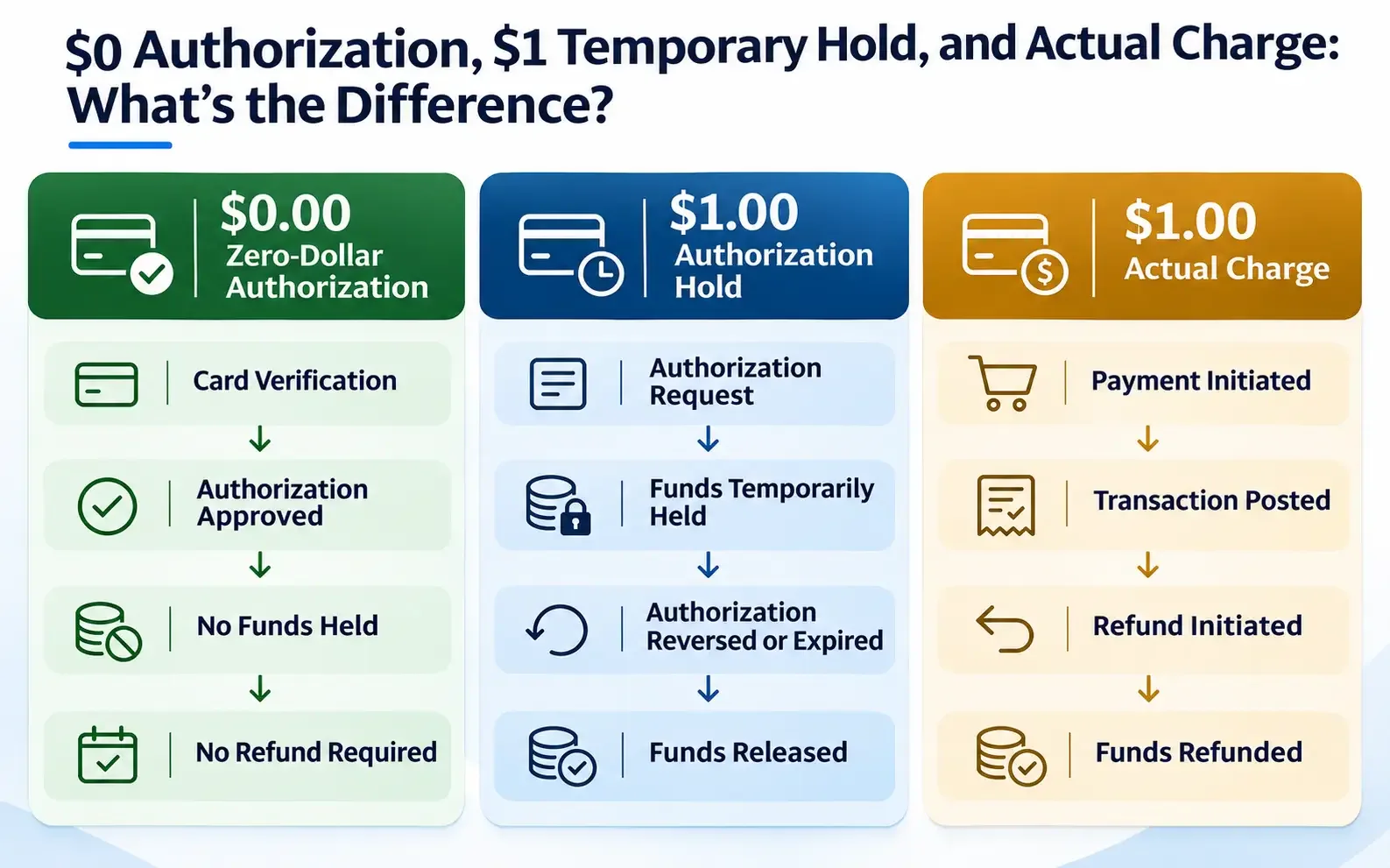
Card payment systems generally involve three types of verification transactions.
Zero-Amount Authorization: The merchant sends a $0 authorization request to the card issuer to verify that the card account is valid and check for issues such as a reported lost card. The authorization itself does not reserve funds and cannot be captured for payment.[1]
Small Authorization Hold: The merchant submits an authorization request for a specified amount, such as $1. Once approved, the issuer temporarily reserves the corresponding portion of the available balance or credit limit, but the merchant has not yet captured the payment.
Small Actual Charge: Some payment services verify a card by charging a small amount, for example, by asking the cardholder to locate a verification code on their transaction statement. Once the transaction has posted, the funds must be returned through a refund.
Transaction type | Effect on funds | How funds are restored |
|---|---|---|
$0 authorization | No funds are reserved | No refund required |
$1 authorization hold | Available balance or credit is temporarily reserved | Funds are released when the authorization is reversed or expires |
$1 actual charge | Funds are debited | Merchant refund |
Suppose a crypto card has an available balance of $20. A merchant requests a $1 authorization, which reduces the available balance to $19 once approved. If the merchant does not capture the payment and subsequently reverses the authorization, the available balance returns to $20, assuming no other transactions or separate fees apply.
$1 Is Not a Standard Card Verification Amount
Both Visa and Mastercard provide zero-amount account verification mechanisms and impose restrictions on the use of non-zero authorizations for account verification.
Section 7.3.10.4 of Visa's October 2026 rules expressly prohibits non-zero authorizations for requests that do not involve a genuine purchase, are not intended to be cleared and settled for the authorized amount, and primarily serve to verify account validity, account status, or the availability of funds. Mastercard also restricts small test authorizations that are not supported by an actual purchase.[2][3]
Nevertheless, some payment providers continue to document different small-amount verification methods. Stripe, for example, may initiate a temporary authorization for $0, $1, or a similar amount when card details are saved. Google uses a temporary hold or charge of less than $1.95 in certain verification code procedures.[4][8]
These are procedures published by individual payment providers, rather than verification methods universally endorsed by the card networks.
2. How Long Does It Take to Get a $1 Test Charge Back?
The time it takes for funds to become available again depends primarily on whether the merchant has captured the payment.
For an uncaptured transaction, the merchant can initiate an authorization reversal, or the funds can be released when the authorization expires under the issuer's rules. If the transaction has already posted, the cardholder must wait for the merchant to issue a refund and the card issuer to process it.
Several widely used payment providers publish the following processing times:
PayPal: Its US Help Center states that a temporary authorization of up to $1, generated when a card is added or updated, may remain in place for anywhere from a few minutes to 30 days. If it has not been released after 30 days, contact the card issuer.[7]
Google Payments: Small holds or charges generated during certain verification code procedures are generally reversed or refunded within 30 days.[8]
RedotPay: A transaction generally takes one to five days to move from Authorized to Reversal status.[9]
These time frames apply to specific processes at each provider. There is no universal fund return period for crypto cards.
An authorization reversal does not necessarily generate a separate refund record. For example, after RedotPay fully reverses a transaction, the original transaction remains in the transaction history with an amount of $0 rather than appearing as a new refund.[9]
If you have not received a refund notification, first check the original transaction status and your available balance or credit limit. Contact the issuer if your funds have not been restored within the processing period published by the provider.
3. How Are Test Charges Different on Crypto Cards?
The main differences between crypto cards and conventional bank cards lie in the source of the funds used for purchases and the form in which those funds are returned after a transaction is reversed or refunded.
Crypto Prepaid Cards Funded With Fiat Currency
These cards must be funded in advance. Purchases are paid for using the fiat balance already loaded onto the card account.
For example, the Crypto.com Prepaid Card's auto top-up feature converts selected crypto assets into an eligible fiat currency and adds the funds to the card account when the balance falls below a specified threshold.[13]
A small authorization reserves part of the card's fiat balance. When the authorization is reversed, the corresponding card balance is restored, rather than the crypto assets held before the top-up.
Cards Funded With Stablecoins or Other Crypto Assets
These products allow cardholders to fund purchases with supported crypto assets without manually converting them into fiat currency beforehand.
RedotPay's official documentation, for example, indicates that card transactions involve converting crypto assets into US dollars. How funds are reserved for a small authorization, when the conversion takes place, and how the balance is restored after a reversal depend on the platform's own accounting rules.[11]
For these cards, 1 USD is a card transaction amount, whereas 1 USDT or 1 USDC represents a quantity of a crypto asset. Although their values are close, exchange rates and transaction fees mean they cannot automatically be treated as equivalent accounting amounts.
Crypto-Backed Credit Cards
Crypto-backed credit cards also involve collateral, available borrowing capacity, and outstanding loan balances.
The ether.fi Cash Card offers two options: Direct Pay Mode and Borrow Mode. The former uses eligible assets held in the account to fund payments, while the latter allows cardholders to borrow against their crypto assets to fund purchases.
According to ether.fi's official documentation, when a completed purchase is refunded in Borrow Mode, the refund is credited to the main Vault balance and does not automatically repay the original loan. Cardholders must repay the loan manually; otherwise, the outstanding balance continues to accrue interest.[14]
When using a crypto-backed credit card, it is therefore important to check both the card transaction status and the available borrowing capacity and loan records.
Why Is My Balance Still Lower After a Test Transaction Is Reversed?
The merchant's transaction amount and any fees charged by the crypto card provider must be accounted for separately.
Some crypto cards charge declined transaction fees, currency conversion fees, or other transaction-related fees. RedotPay, for example, states that a declined transaction may incur a fee even when the purchase amount itself has not been debited.[10]
A declined transaction, an authorization reversal, and a refund after a transaction has posted are distinct transaction states. The fact that a provider charges declined transaction fees does not mean it also charges fees for transactions that were successfully authorized and subsequently reversed.
If a transaction has been reversed but the account balance has not been fully restored, check the itemized fees, asset conversion records, and applicable fee schedule rather than relying solely on the merchant's transaction amount.
4. Why Do Crypto Cards Fail Small-Amount Verification?
Even a very small verification amount must comply with the payment rules and pass the risk checks imposed by the merchant and card issuer.
If card verification fails, start by checking the following:
Card status: Whether the card has been activated or is frozen, expired, or deactivated.
Available funds: Whether the available balance or credit limit can cover a non-zero authorization and any associated fees.
Payment settings: Whether online and cross-border payments are enabled and whether any transaction limits have been exceeded.
Card details: Whether the card number, expiration date, security code, and billing address are correct.
Merchant compatibility: Whether the merchant accepts virtual cards, prepaid cards, or cards issued in the relevant region, and whether the payment channel supports zero-amount verification.
Transaction restrictions: Whether the card provider restricts the relevant merchant category code (MCC) or transaction type.
Authentication and risk controls: Whether the required 3D Secure authentication has been completed and whether the merchant's or issuer's risk controls have declined the transaction.[5][8]
If a zero-amount account verification fails, prioritize checking the card status, payment permissions, and merchant compatibility rather than adding funds unnecessarily. If a non-zero authorization, such as $1, fails, also check whether sufficient funds are available.
Successfully linking a card does not guarantee that subsequent payments will go through. A card may pass account verification but later be declined during an actual payment because of insufficient funds, transaction limits, geographic restrictions, lack of support for recurring payments, or additional authentication requirements.
If verification fails repeatedly, identify the reason for the decline before trying again. Repeated attempts will not resolve merchant compatibility issues and may trigger additional risk controls or incur declined transaction fees.
5. Could an Unrecognized Small Charge Be Card Fraud?
Small transactions are commonly used in card fraud schemes.
Fraudulent card testing involves using card details obtained without authorization to determine whether a card is valid before making further unauthorized purchases. Unusual zero-amount authorizations and small charges may both be associated with this activity.[6]
Be particularly alert to the following situations:
You receive a small transaction notification without having recently linked a card, started a subscription, or made a purchase.
Several unexplained authorizations or charges appear within a short period.
You receive a payment authentication request for a transaction you did not initiate.
An unusual small transaction is followed by other unauthorized purchases.
An unfamiliar merchant name does not necessarily indicate fraud. The merchant name on a card statement may reflect a registered company name, a parent company, or a payment processing business rather than the service brand you recognize. Check the transaction time, subscription history, and merchant information to identify the payment.
Multiple small transactions from the same merchant do not necessarily mean you have been charged more than once. Relinking a card, submitting multiple verification requests, or a provider displaying authorizations, reversals, and refunds separately can all generate multiple transaction records. To determine whether a duplicate charge has occurred, check the number and amounts of transactions that have actually posted and whether funds have been reserved more than once.
If you cannot reasonably identify the source of a transaction, freeze the card immediately, contact the issuer through official channels, review your other transactions, and retain the relevant records. Do not approve payment authentication requests you did not initiate. If your card details have been compromised or unauthorized purchases are confirmed, follow the issuer's instructions to replace the card and dispute the transactions within the applicable time limit.[12]
6. What Should You Do When a Test Charge Appears?
Situation | Recommended action |
|---|---|
A $0 transaction appears after you link your card | Confirm the verification result and check for any separate fees |
A pending $1 transaction appears after you link your card | Check the authorization status and when the funds should be released |
The authorization has been reversed, but there is no refund record | Check whether the available balance or credit limit has been restored |
A small transaction has already posted | Ask the merchant about the purpose of the charge and its refund arrangements |
Duplicate charges appear from the same merchant | Verify the amounts actually posted and contact the merchant and card issuer |
Verification fails repeatedly | Stop retrying and investigate the decline reason and any associated fees |
The balance has not been restored within the stated processing period | Contact the issuer to check the authorization hold or refund status |
An unauthorized small transaction appears | Freeze the card immediately, report the suspicious transaction, and review the account |
When contacting customer support, you can provide the transaction time, amount, currency, merchant name, last four digits of the card number, transaction reference number, and screenshots with sensitive information redacted.
Do not send your full card number, security code, payment verification codes, wallet private key, or recovery phrase to customer support representatives or third parties. Do not submit card information through unfamiliar links.
References
Card Networks and Payment Networks
Visa Acceptance Solutions — Account Verification with a Zero Amount Authorization
Visa — Visa Core Rules and Visa Product and Service Rules, October 24, 2026 edition, Sections 7.3.10.2 and 7.3.10.4. The rule in Section 7.3.10.4, ID# 0031264, took effect on October 24, 2026, and on November 2, 2026, in Chile.
Mastercard — Transaction Processing Rules, June 10, 2025 edition, Sections 2.1 and 2.2 and applicable regional supplementary rules.
Payment Providers and Transaction Risk Controls
Stripe — Card declines
Stripe — Protect yourself from card testing
PayPal — Why did PayPal charge $1 to my card?
Google Pay — Fix issues with payment method verification codes
Crypto Card Providers
RedotPay — What Does the “Reversal” Status Mean on My Transaction?
RedotPay — What Does “Declined” Mean on My Transaction?
RedotPay — How Is the Cryptocurrency Exchange Rate Determined?
RedotPay — How To Dispute a Card Transaction You Don't Recognize
Crypto.com — Crypto.com Prepaid Card Auto Top-up
ether.fi — Understanding your Cash card: Borrow Mode vs Direct Pay Mode
Sources verified on November 27, 2026.